Publish & export
Paid unlock: get paid with ECPay, Buy Me a Coffee and Patreon
Make part of your work paid. Players pay you directly with ECPay, Buy Me a Coffee or Patreon and it unlocks right away. Setup, review, refunds and receipts, plus the laws and responsibilities creators should know.
Paid unlock: get paid with ECPay, Buy Me a Coffee and Patreon
Paid unlock is an official Larch plugin. Make part of your work paid, and players unlock it and keep playing as soon as they pay. Players pay you directly through your own ECPay, Buy Me a Coffee (BMC) or Patreon: Larch never holds the money and takes no cut.
Works on every plan, including Free. Paid works are reviewed by Larch before players can buy.
Three ways to get paid
- ECPay: Larch creates the order on ECPay. Players pay in NT$ by card, ATM transfer or convenience store code, and the money goes to your ECPay account. You need a Taiwan ECPay account, and individual sellers can only accept Taiwan-issued cards, so it suits players in Taiwan.
- Buy Me a Coffee: create an item on BMC and paste its link into Larch. Players pay on BMC (priced in US$), and the content unlocks as soon as the payment notice arrives. It suits players abroad.
- Patreon: link your Patreon and choose which membership tiers unlock content. Players link their own Patreon and can play while they’re active members; content locks again after they cancel, unless you choose to keep it unlocked.
You can turn on all three; players choose in the purchase window. ECPay, BMC and Patreon charge you their own fees. Larch charges nothing extra.
What you can charge for
- The whole work: players buy before they can start, and can choose to pay more to support you.
- Paid chapters: each board is a chapter, and players stop to buy when they’re about to enter a paid one.
- Paid locks: put a Paid lock card in the middle of the story; what comes after it needs paying for.
Prices run from NT$30 to NT$5,000. Larch’s server guards paid content: players who haven’t bought never receive it, so developer tools can’t reveal it.
Step 1: Add the plugin and place a paid lock
- Go to Marketplace → Plugins, open “Paid unlock”, press Add to My Assets, then add it to your work.
- Double-click the board (or press Add card) → Plugins tab: you’ll see the Paid lock card and Paid unlock settings.
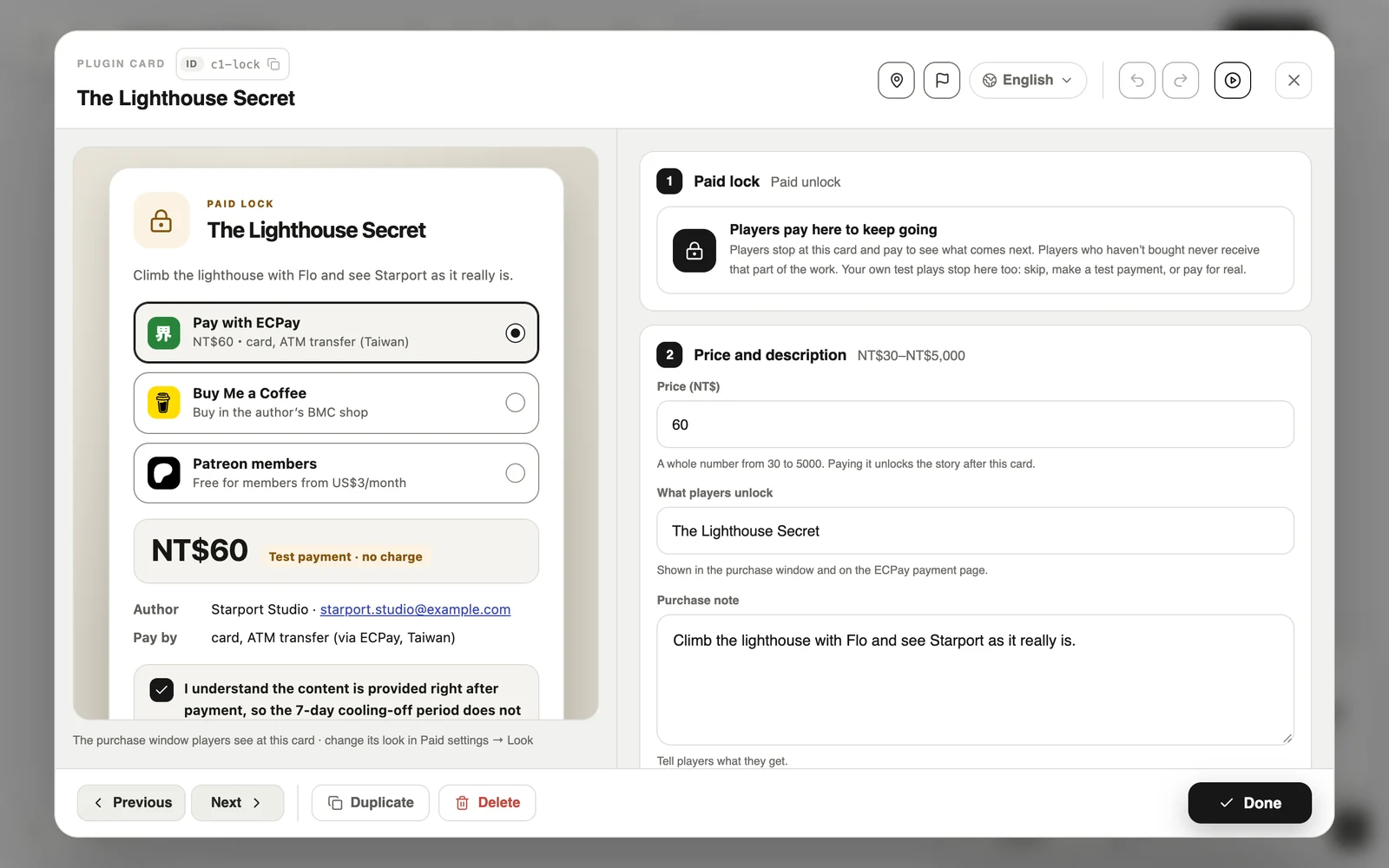
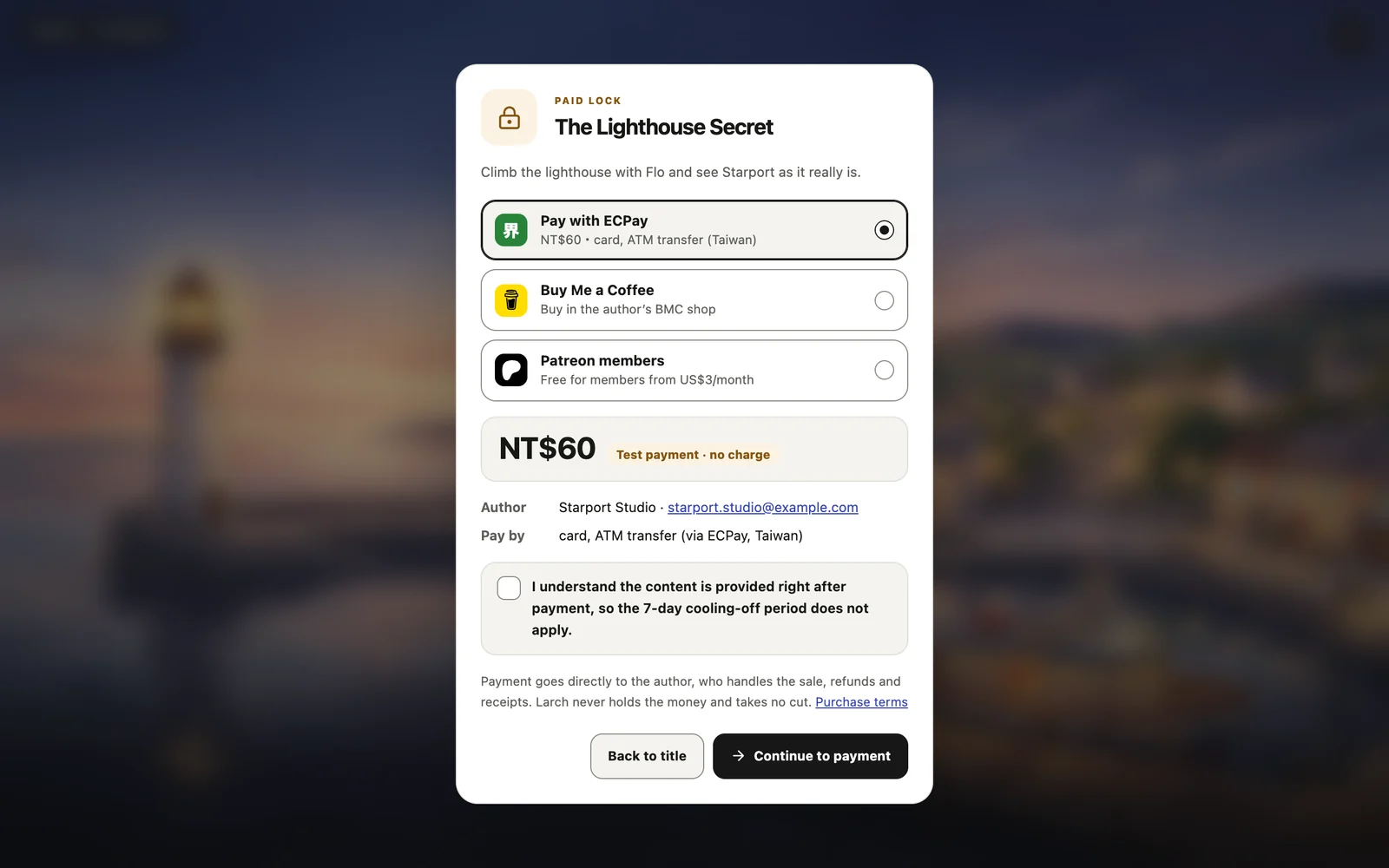
- Place a Paid lock where you want to charge, double-click it, and fill in the price, what players unlock and a purchase note. The left side shows the purchase window players will see.
Step 2: Connect how you get paid
Open Account settings → Payments → Setup. ECPay, Buy Me a Coffee and Patreon each have a tab with an on/off switch. Also add a support email: players write to it for refunds and receipts, and it’s required for charging.
ECPay
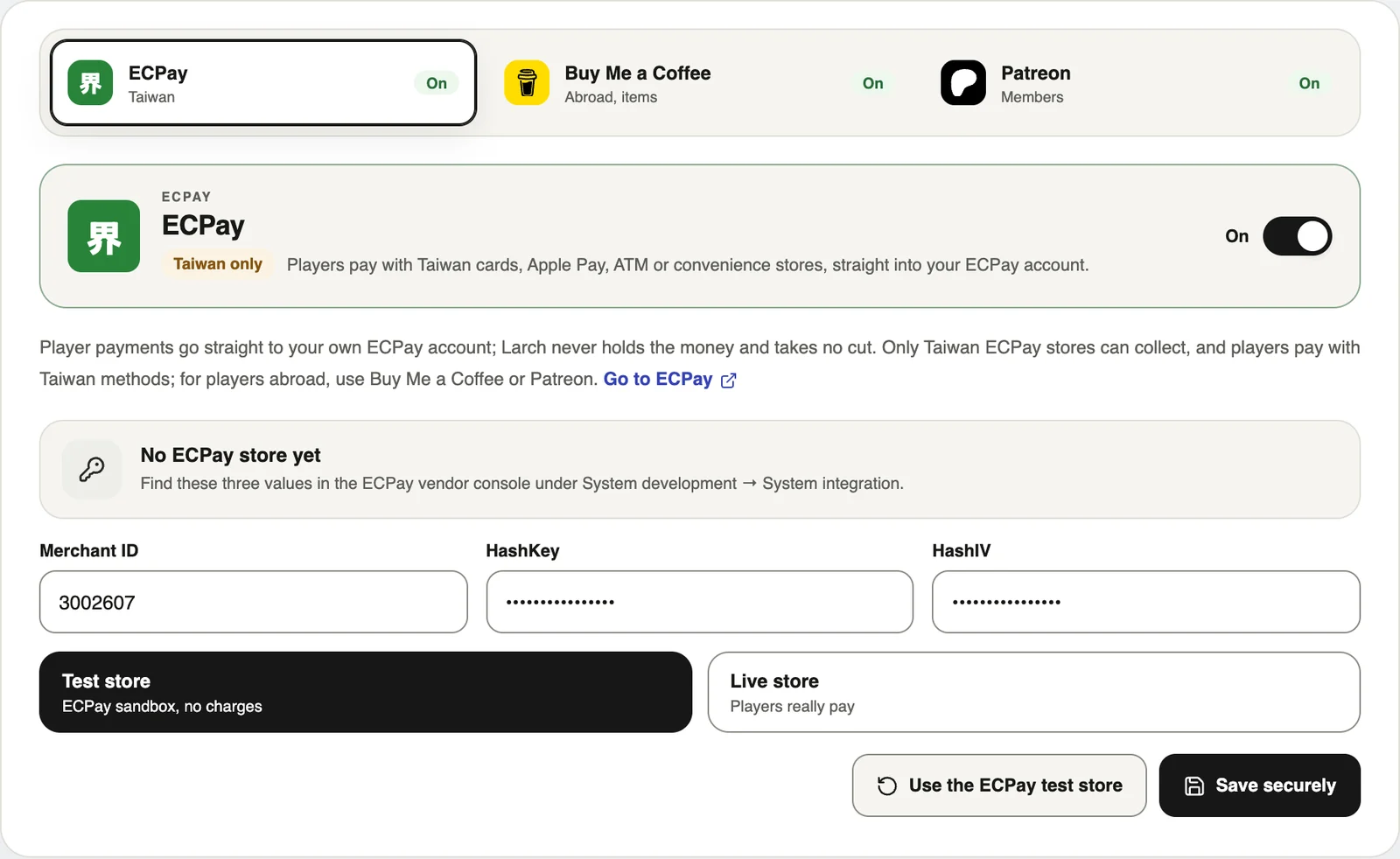
- In the ECPay vendor console under System development → System integration, find your Merchant ID, HashKey and HashIV. Enter them, choose Live store and press Save securely.
- No ECPay account yet, or just trying it out? Press Use the ECPay test store to go through the whole flow with ECPay’s public test store; nothing is charged. On the payment page use test card 4311-9522-2222-2222, security code 222 and any future expiry date.
Buy Me a Coffee
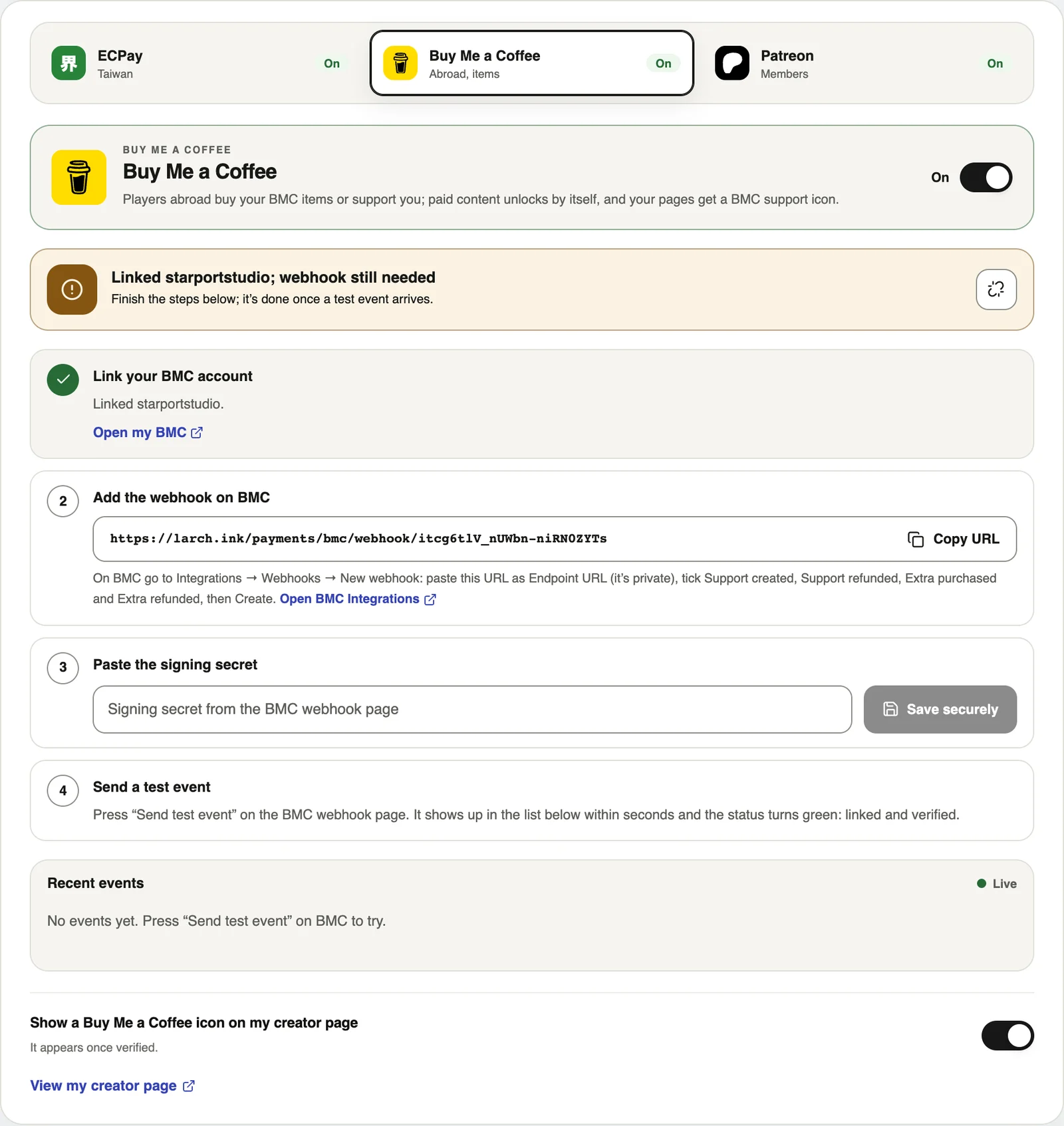
- Enter your BMC name or page address.
- Copy the webhook URL Larch gives you. On BMC go to Integrations → Webhooks → New webhook, paste it, and tick Support created, Support refunded, Extra purchased and Extra refunded.
- Paste the Signing secret from BMC back into Larch and press Save securely.
- Press Send test event on BMC. Once Larch receives it, the status turns green: linked and verified.
Patreon
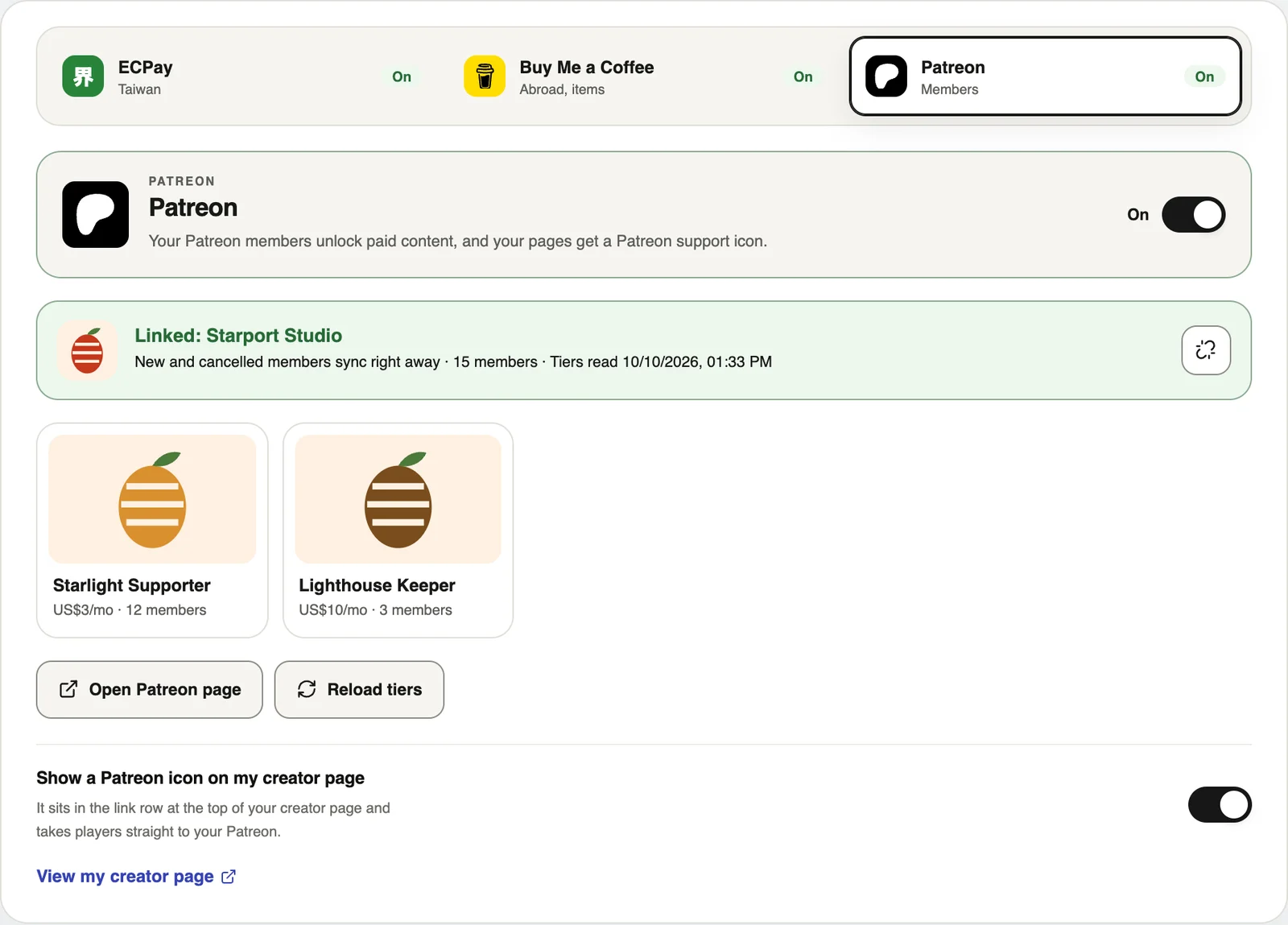
- Press Link Patreon and approve on Patreon. Larch reads your membership tiers and sets up membership-change notices on your Patreon.
- If you add or change tiers later, come back and press Reload tiers. No tiers yet? Create them first with Patreon’s guide.
Step 3: The work’s paid settings
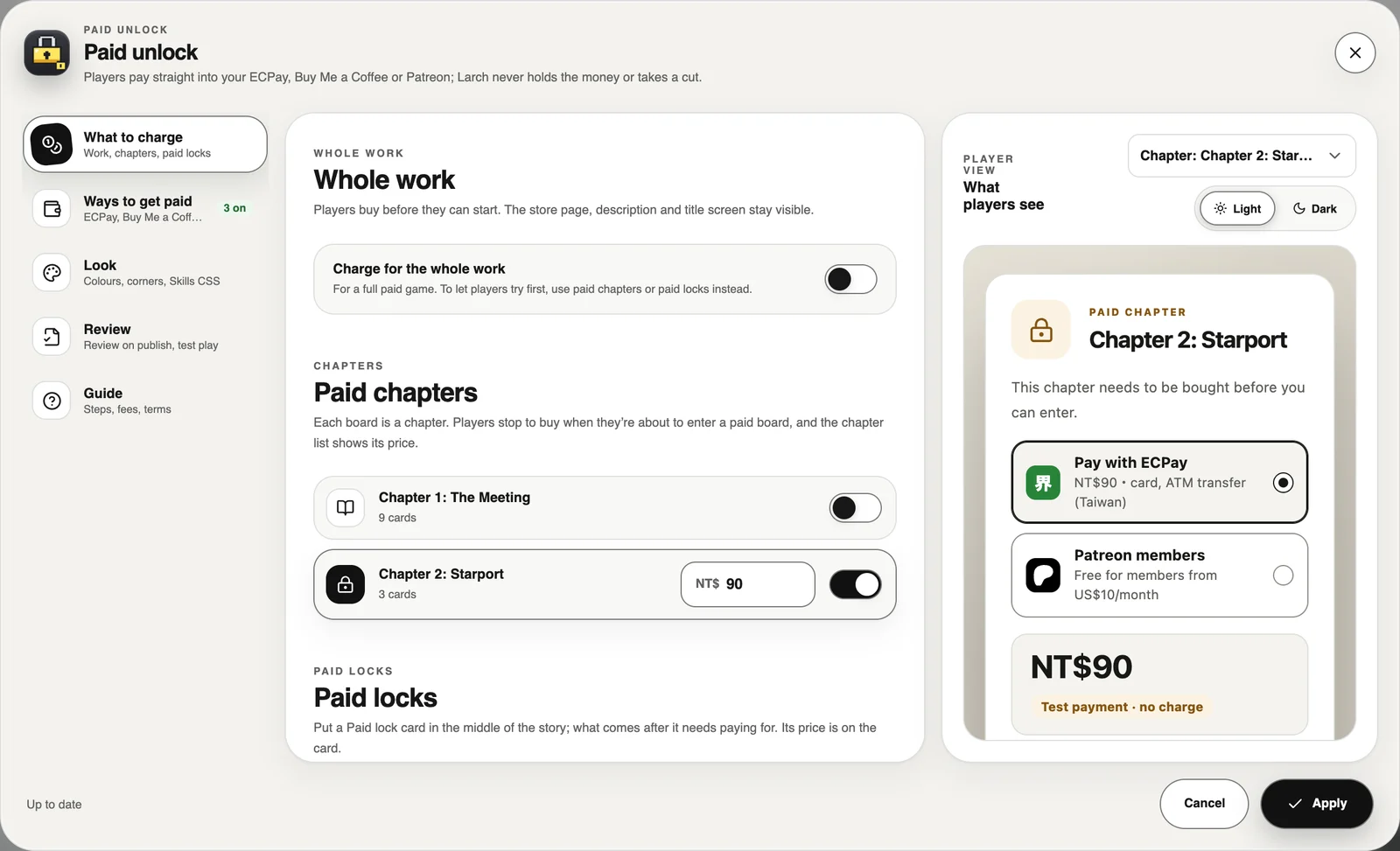
In the Plugins tab press Paid unlock settings to open this work’s settings:
- What to charge: prices for the whole work, paid chapters and paid locks.
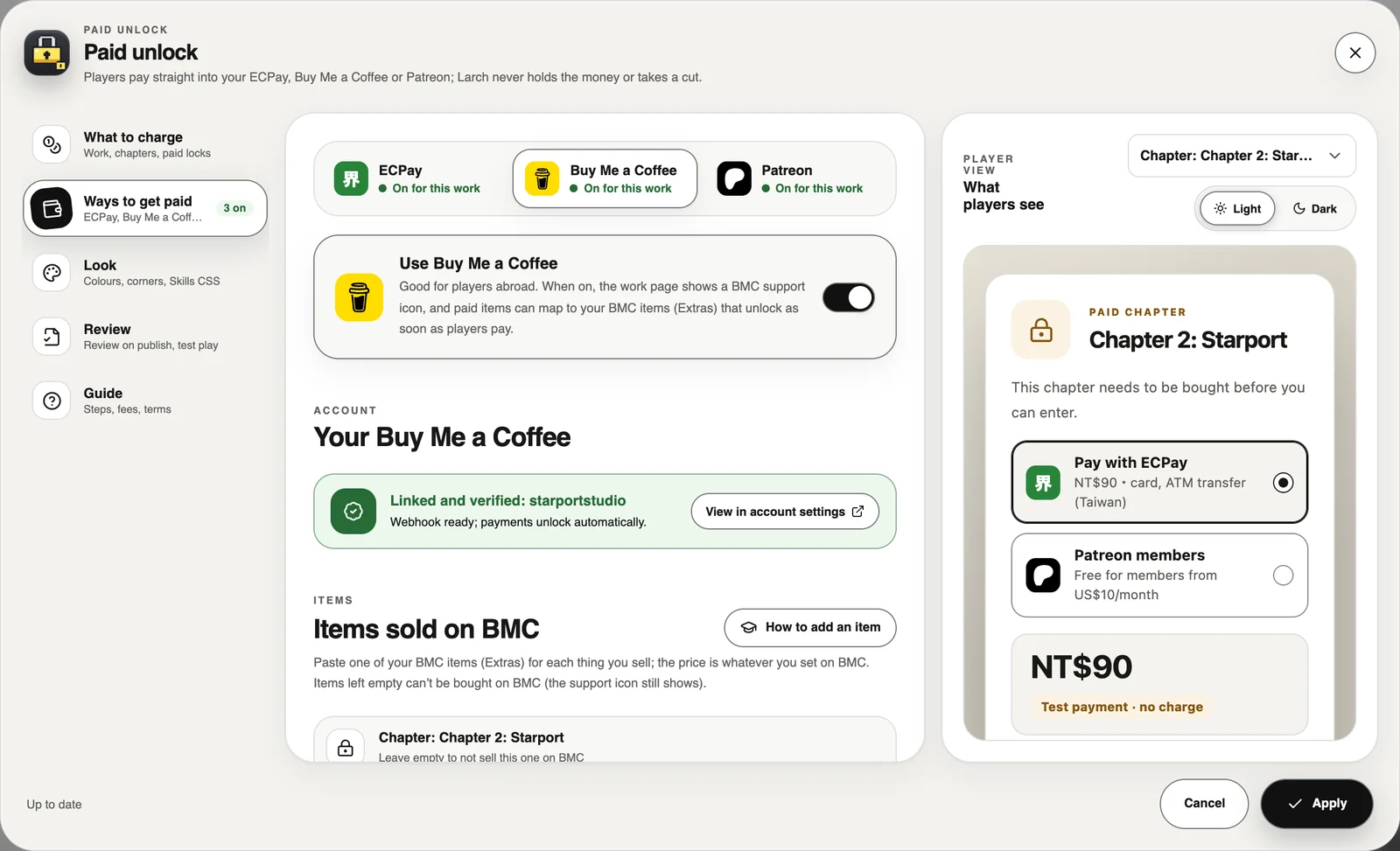
- Ways to get paid: pick ECPay, Buy Me a Coffee or Patreon at the top and turn each on or off. For BMC, paste the matching item link for each paid item; for Patreon, choose which tiers unlock.
- Look: the purchase window’s colours and corners, or copy the Skills to have an AI write CSS. The price, payment methods and terms can’t be hidden; if they are, the window falls back to the Larch look.
- Review: the pre-review checklist and review status.
The preview on the right is the purchase window players see; you can switch items and light or dark.
Create an item on Buy Me a Coffee
- Open Shop in your BMC dashboard and add an item. Set up payouts on BMC first.
- Name it like the Larch item so players recognise it, and set the price in US$.
- Turn on Ask a question and ask for “Your Larch account email”, so payments made with another email still match.
- You can put your work’s play link in Redirect to a URL after purchase so players land back in the game.
- Publish it, copy the item URL (like buymeacoffee.com/yourname/e/123456) and paste it next to the matching item in Paid unlock settings.
More detail in BMC’s official guide.
Step 4: Test it yourself
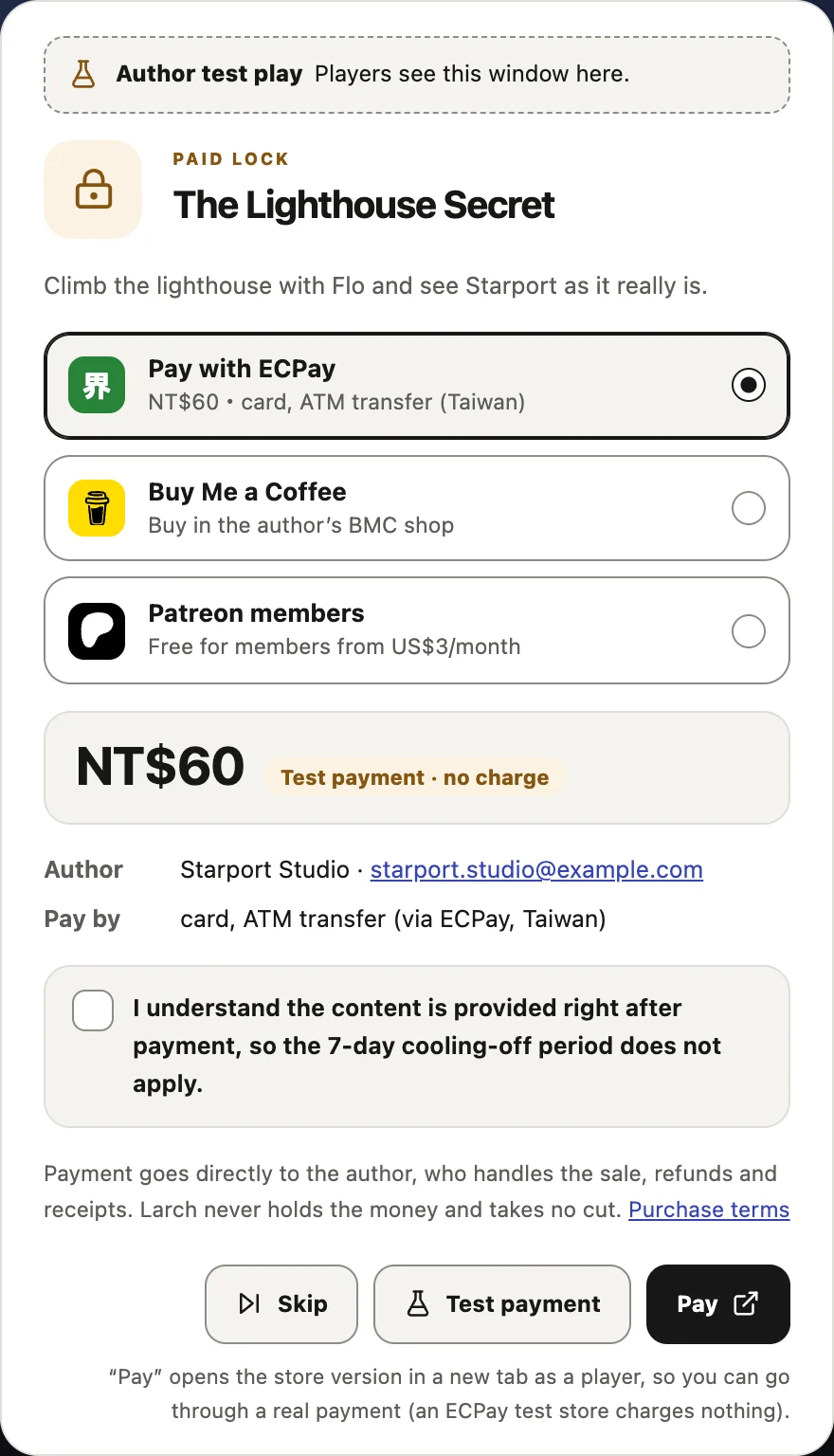
Press Play in the studio. Playback stops at anything paid and shows the author’s purchase window:
- Skip: treat it as bought and keep playing.
- Test payment: simulate a successful payment and see what unlocks.
- Pay: open the store version as a player and go through a real payment (an ECPay test store charges nothing).
Step 5: Publish and send for review
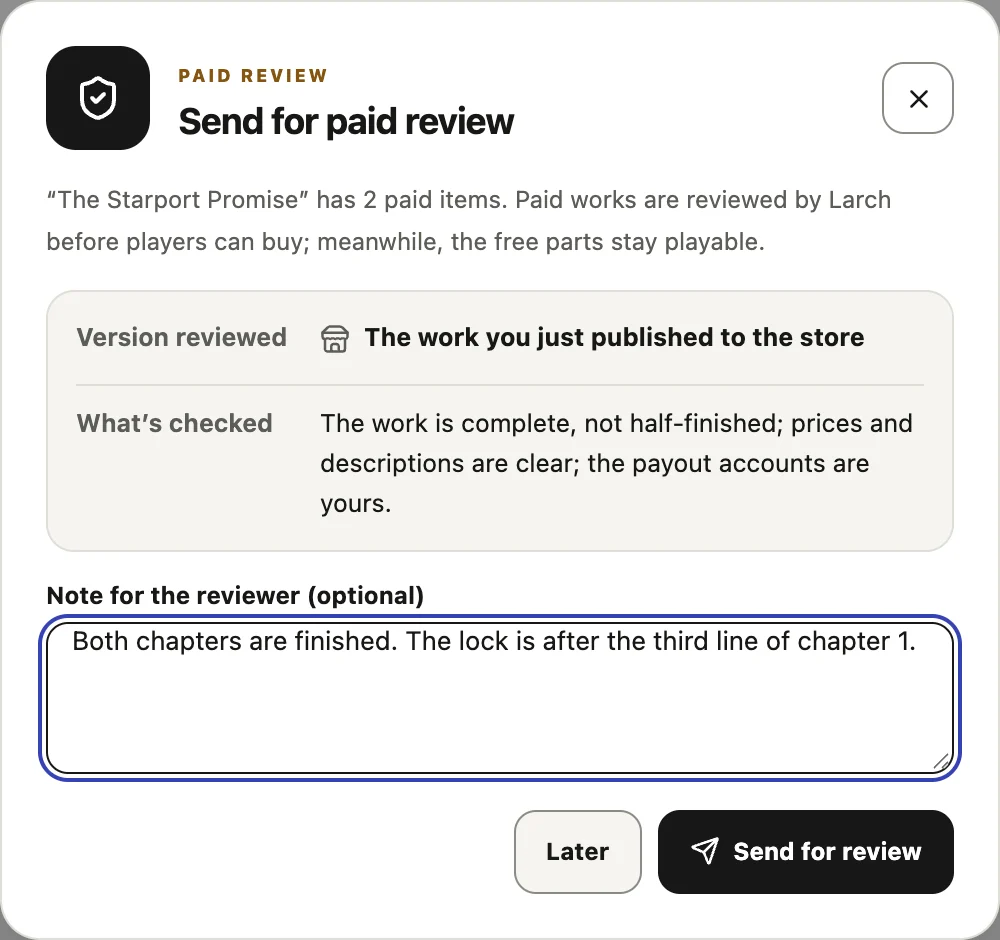
After you publish to the marketplace, or create a play link with Export game → Play Link, Send for paid review pops up. An admin plays your published version all the way through in review mode to check that:
- The work is complete, not half-finished.
- Prices and descriptions are clear.
- The payout accounts are yours.
You’ll be notified when it’s done. While it’s in review, players can play the free parts; once it’s approved they can buy. Adding another way to get paid, or switching ECPay store, BMC account or Patreon page, needs a new review; price changes don’t.
How players buy
- Players sign in to Larch first. What they buy is tied to their account, so it works in the marketplace and on any play link you share.
- ECPay: tick the consent box and continue to ECPay. After paying, the game unlocks itself and carries on. ATM and store codes unlock once the payment arrives.
- Buy Me a Coffee: pay on your BMC item page. If they pay with their Larch email it unlocks automatically; otherwise they press “I’ve paid but it’s still locked” to report it. Larch matches the payment, and you confirm anything that doesn’t match.
- Patreon: link Patreon; active members of the chosen tier (or higher) unlock it.
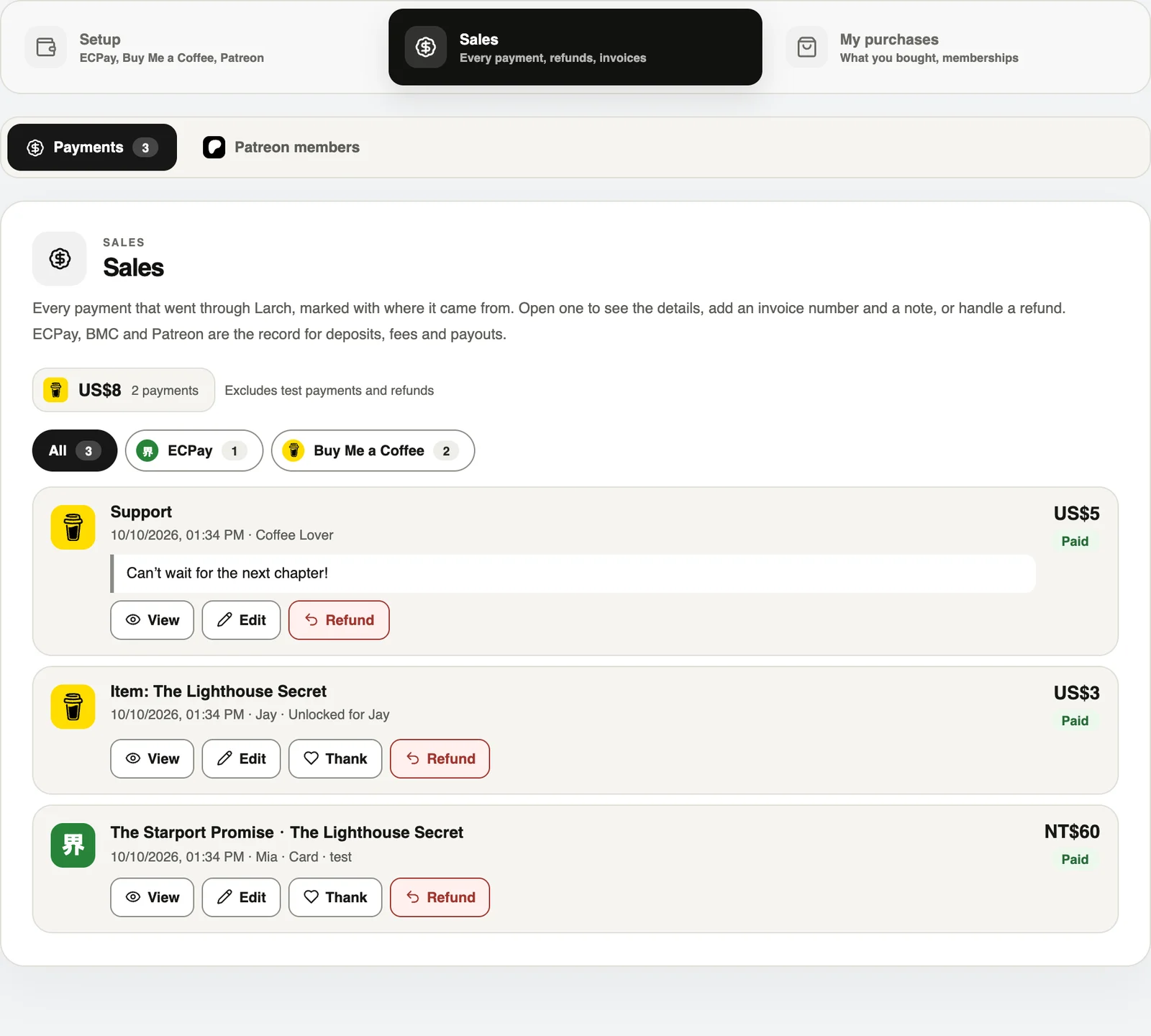
Sales, refunds, receipts and thank-you notes
Account settings → Payments → Sales lists every payment, with an icon showing where it came from; you can filter by source. ECPay, BMC and Patreon remain the record for deposits, fees and payouts.
- View, Edit: see the details, add an invoice number (players can see it) and a note only you can see.
- Refund: refund ECPay payments in the ECPay vendor console, then mark them refunded in Larch. BMC refunds withdraw the unlock automatically, and you can mark one by hand if no notice arrived. After a refund, the purchase’s unlock is withdrawn.
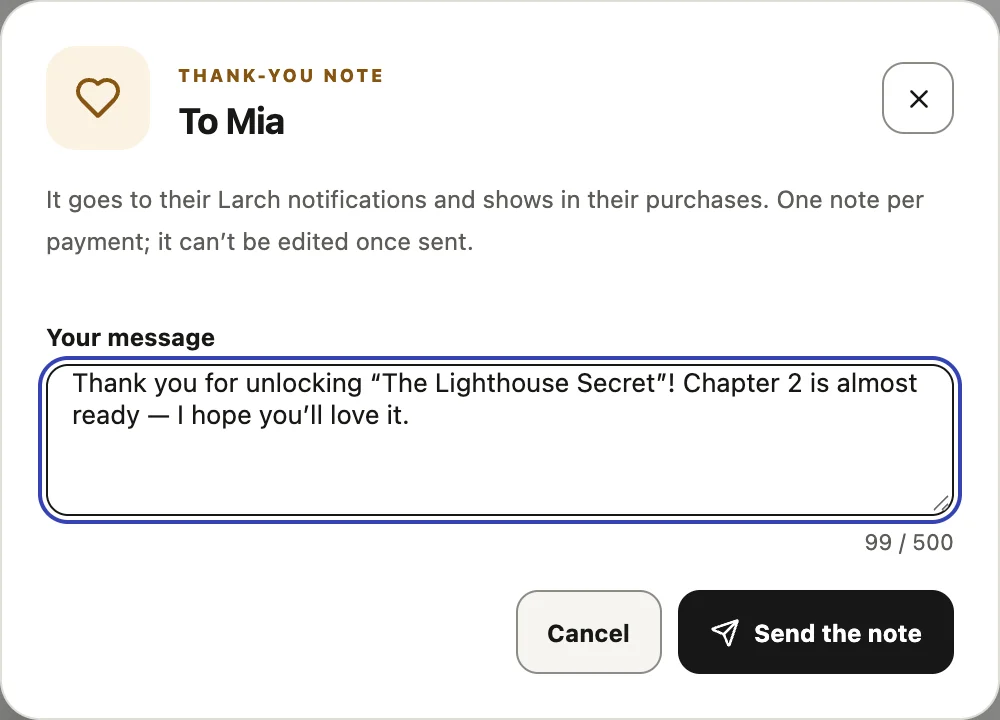
- Thank: for payments from players with a Larch account (ECPay buyers, BMC payments matched to an account, Patreon members) you can send a thank-you note. It arrives in their Larch notifications and shows in their purchases. One note per payment.
- Patreon members tab: members who linked a Larch account.
“Expired” means the player opened the ECPay payment page but didn’t finish in time, so nothing was received. Larch never holds money or card numbers, so it can’t charge players from here; they can simply buy again.
Support icons
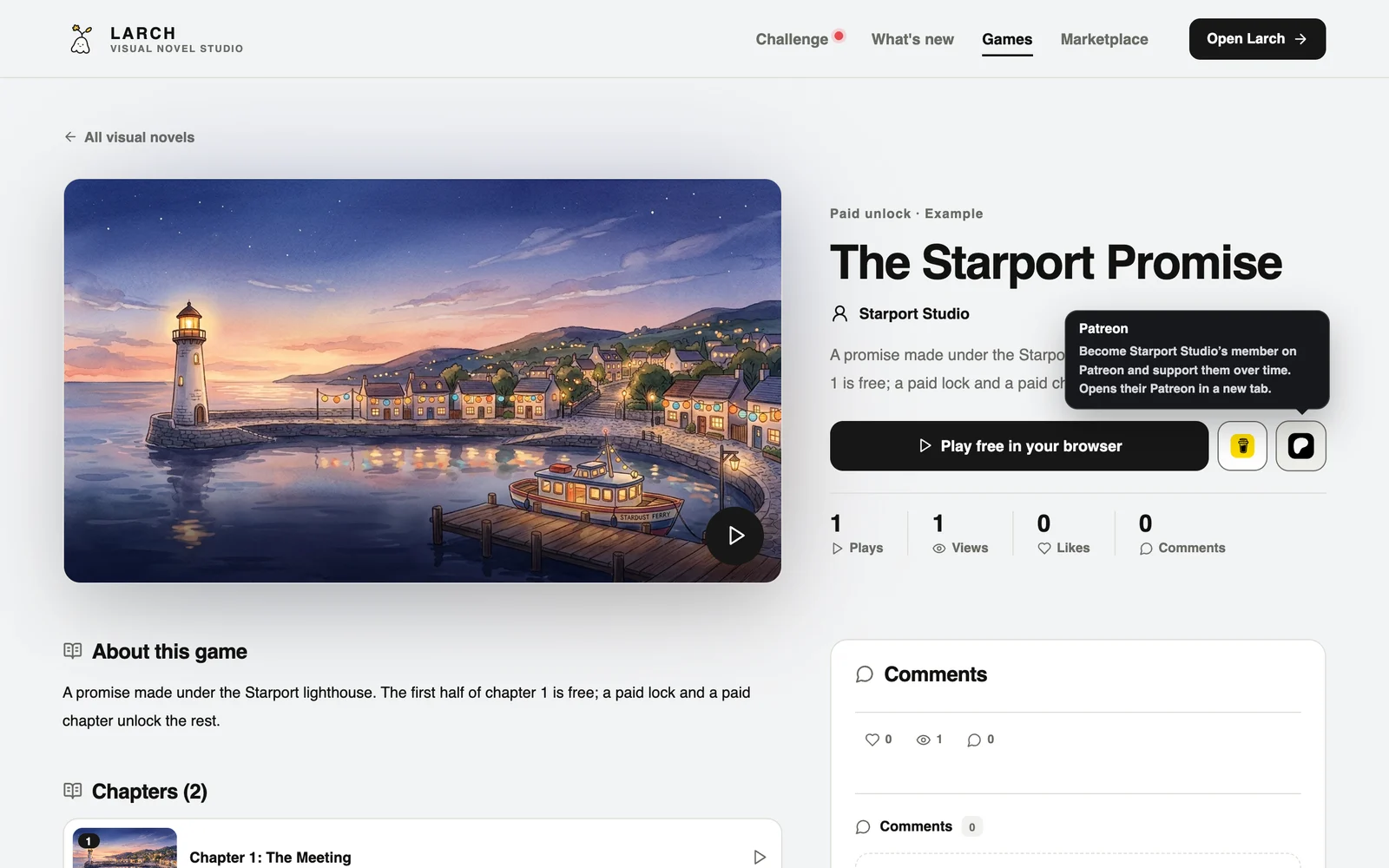
With Buy Me a Coffee or Patreon on, your work pages and creator page show their icons; players click to open your page and support you. Icons alone need no review, and you can hide the creator-page icons in Setup.
Laws and responsibilities
This is a general overview, not legal or tax advice. Everyone’s situation differs; if in doubt, ask an accountant, a lawyer or your local tax office. The Taiwan rules below apply to sellers in Taiwan.
Who the seller is
- You are the seller: the sale, refunds, receipts, taxes and customer service are your responsibility.
- Larch is the tool: Larch provides the platform and the unlocking. It isn’t a party to the sale, never holds the money, takes no cut, and doesn’t issue receipts or file taxes for you.
- You also need to follow the terms of ECPay, Buy Me a Coffee and Patreon, such as the goods they don’t allow.
Consumer protection: the 7-day cooling-off period and what players must be told
- Selling online is a “distance sale”. Under Article 19 of Taiwan’s Consumer Protection Act, consumers can generally cancel within 7 days of receiving the goods.
- Digital content is an exception: under Article 2, item 5 of the Reasonable Exceptions to the Right of Cancellation in Distance Sales, digital content not supplied on a physical medium, or online services completed once provided, is exempt if the consumer agreed in advance. That means telling players clearly and getting their consent first: Larch’s purchase window asks players to tick “I understand the content is provided right after payment, so the 7-day cooling-off period does not apply”, and they can’t pay without it.
- Under Article 18 of the same Act, distance sales must tell consumers clearly who the seller is, how to reach them, the price and how to pay. Larch’s purchase window shows your name, support email, price and payment methods, and links the Paid unlock terms. Make sure your support email works and gets answered.
- Keep prices and descriptions clear, and don’t exaggerate or mislead, such as promising a “complete ending” that isn’t finished.
- No cooling-off period doesn’t mean no refunds: if the work is broken, won’t play, or doesn’t match its description, handle refunds properly.
Tax and receipts (Taiwan)
- If you keep selling online to make money, the income goes on your individual income tax return.
- Business tax: under the Ministry of Finance’s thresholds from 2025, individuals selling online whose monthly sales stay below NT$100,000 for goods or NT$50,000 for services don’t need to register for business tax yet. Above that you must register with the National Taxation Bureau and pay business tax, and at higher sales you’ll be told to issue uniform invoices. Whether digital content counts as goods or services is up to the tax office.
- Sales on different platforms and accounts by the same person are added together.
- If you issue uniform invoices, add the invoice number in Sales; players see it in their purchases.
- If you live outside Taiwan, or collect foreign currency through BMC or Patreon, follow your own country’s tax rules; whether BMC or Patreon withhold tax depends on their terms.
- Official source: Ministry of Finance e-Tax portal, online sales taxation.
Players’ personal data
- In Sales you can see buyers’ names, BMC payers’ names and notes, and the email a player gives when reporting a payment.
- Under Taiwan’s Personal Data Protection Act (and similar laws elsewhere), use this data only for the sale, refunds and support. Don’t publish it, use it for marketing or pass it on.
- Larch never receives players’ card numbers, and keeps BMC payers’ emails only as irreversible hashes.
Content and copyright
- Only sell what you have the right to sell: images, music, fonts and assets must allow commercial use. Many free assets are non-commercial only (such as CC BY-NC) and can’t go into a paid work.
- Not allowed: illegal content, content that infringes others’ rights, adult content, goods unrelated to the work, or collecting money on someone else’s behalf.
- Works with paid content can’t be opened for remix.
Players under 18
- Under Taiwan’s Civil Code, purchases by players under 18 generally need a legal guardian’s consent, except small everyday purchases suited to their age. If a parent writes that their child bought without permission and asks for a refund, look into it promptly.
Larch’s role
- Larch can review, decline, pause or switch off charging for a work.
- When your plan ends, new sales and support icons stop; players who already bought keep playing.
- If there’s a dispute, contact the player first. Players who need help can tell Larch through feedback, and we’ll pass it on.
- For the full rights and responsibilities, read the Paid unlock terms.
FAQ
- Do exported web or EXE builds charge players? No. Exports don’t charge, and the paid content is fully included in the files, so decide whether to export and who to share with.
- Can I charge a player from Larch? No. Players pay you directly on ECPay, BMC or Patreon; Larch has no card numbers and can’t charge for you.
- Does Larch take a cut? No. ECPay, BMC and Patreon charge their own fees.
- I don’t have an ECPay account. Use Buy Me a Coffee or Patreon only; you can also try the ECPay flow with the test store.
- Do price changes need a new review? No. Adding another way to get paid or switching payout accounts does.
- What happens when my plan ends? New sales stop; players who already bought keep playing.