Comparisons
Ren'Py alternative: make a visual novel without code (Larch vs Ren'Py)
Want to make a visual novel but not learn to code first? A fair look at how Ren'Py and Larch work, what each does well and who each suits. Larch can also export a Ren'Py project, so you can use both.
Ren'Py alternative: make a visual novel without code (Larch vs Ren'Py)
Far more people have stories than have the skills to make games. Many people carry a story they want others to play, and what stops them is rarely the story. It is the tool. We believe everyone has a story, and every story deserves to be made.
When people think about making a visual novel, Ren'Py often comes first. It is a great engine, but you write your game as a script. This article compares Ren'Py and Larch. Both make visual novels, but they work very differently and suit different people.
The short answer: If you are happy to write scripts and want full control, Ren'Py is a great fit. If you would rather not code and want to start in your browser, try Larch. You can also use both: Larch can export your game as a Ren'Py project.
What is Ren'Py?
Ren'Py is a free, open-source visual novel engine with a long history. You write the story in text files using Ren'Py's own scripting language, which is built on Python, and you can drop into Python when you need to. Finished games can be built for Windows, macOS and Linux, and packaged for Android and other platforms.
Where Ren'Py shines
- Free and open source: No licence fees, and the source code is public.
- Full control: Menus, transitions, saves and game systems can all be changed in code.
- Plain-text scripts: Fast to type and easy to keep in Git.
- Mature community: Plenty of tutorials, examples and shared code.
- Cross-platform builds: One project can be built for several platforms.
Who Ren'Py suits best
- People who already code, or want to learn scripting and Python.
- Creators who want to design their own interface and systems down to every detail.
- Writers who like drafting long scripts in a text editor.
- Projects that need native macOS, Linux or mobile builds.
What is Larch?
Larch is a no-code visual novel maker and RPG maker that runs in your browser. There is nothing to install and no code to write. You build the story on a board: each card is a scene, and drawing a line between cards is where the story goes next.
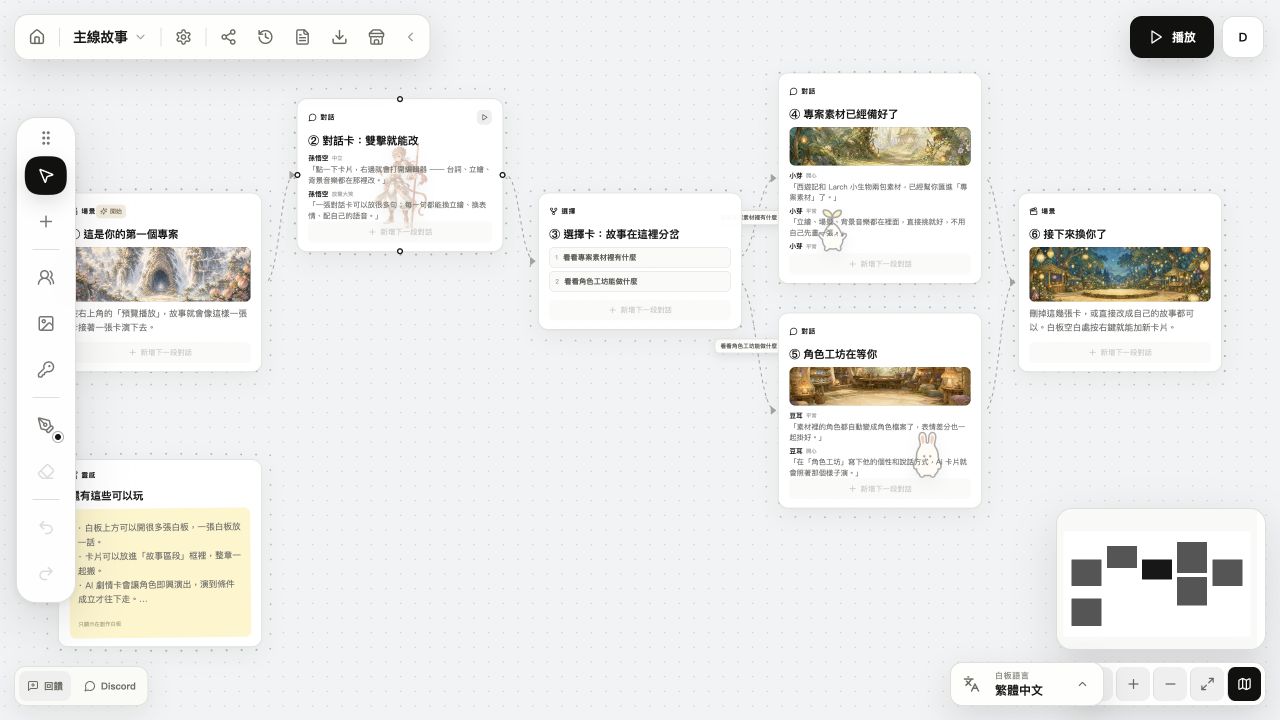
- Branches and variables: Choice cards hold the options, lines can carry conditions, and variables live on the board.
- Character staging: Expressions, portraits and dialogue staging are set in the editor, with Live2D and Spine support.
- AI tools: Image generation, expression variants, background removal, voice, translation, and turning a TXT script into cards.
- AI characters in your game: AI dialogue cards let characters answer players live. You can also work with AI agents such as Claude.
- More than visual novels: The same tool makes RPGs with maps, battles and quests, card adventures, and 3D scenes through the 3D extension.
- Make it together: Share a board and edit it with friends at the same time.
- Saved for you: Projects are saved in the cloud, with automatic version snapshots.
Who Larch suits best
- People with a story to tell who do not want to learn to code first.
- Anyone who wants a playable, shareable story on day one.
- Creators who want AI help with art, voice and translation, or AI characters that talk back.
- Friends who want to build on the same board together.
- Anyone curious about making an RPG without code.
Ren'Py vs Larch at a glance
- Writing the story: Ren'Py: a script in text files. Larch: cards and lines on a board.
- Coding: Ren'Py: learn its script syntax, and Python for advanced features. Larch: no code.
- Install: Ren'Py: download it to your computer. Larch: open it in a browser; a computer is recommended for making games.
- Cost: Ren'Py: free and open source. Larch: the free plan makes complete games (up to 100 cards per project); Pro removes the card limit and adds more AI.
- Customisation: Ren'Py: almost everything can be changed in code. Larch: you adjust things in the built-in editors, designers and extensions.
- AI: Ren'Py is a scripting engine. Larch has built-in image generation, voice, translation and in-game AI characters.
- Collaboration: Ren'Py projects are ordinary files, so teams usually share them through version control such as Git. Larch: edit the same board at the same time.
- Genres: Ren'Py focuses on visual novels; other gameplay is yours to code. Larch: visual novels, RPGs, card adventures and a 3D extension.
- Publishing: Ren'Py: builds for each platform. Larch: a play link, the Larch store, a web build, a Windows EXE, or a Unity, Godot, Unreal or Ren'Py project.
- Community: Ren'Py: a long history and lots of resources. Larch: newer, with creators sharing progress and devlogs in the Teahouse.
Use both: export a Ren'Py project from Larch
You do not have to pick one. You can shape the story and its branches on the Larch board, playtest it, then export a Ren'Py project and keep going in Ren'Py with your own code.
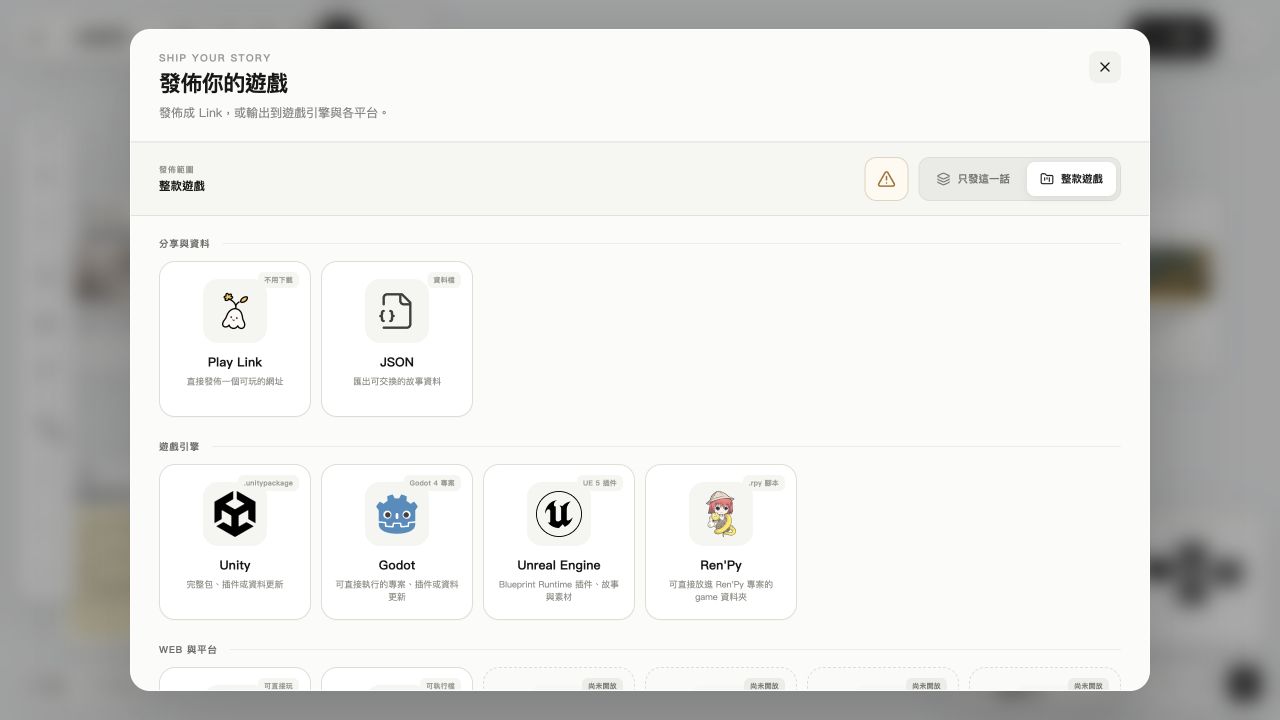
- Click Export game in the toolbar above the board and choose Ren'Py.
- You get a game folder with separate .rpy files for the script, characters, variables and images, and the media can be packed with it.
- Create a new project in the Ren'Py launcher, put the game folder in it, and launch.
- What carries over: Dialogue, characters, choices (as menus), conditions, variables, music, sound effects and voice. A second language is exported as Ren'Py translation files.
- What you add yourself: Ren'Py's own interface templates (gui.rpy and screens.rpy). AI dialogue, AI mini-game and extension cards are left as comments, and text effects such as shake and wave are not carried over.
It works the other way too: import a Ren'Py .rpy file from the board manager. Labels, menus, if statements and variable assignments become cards; python and screen blocks are skipped, and Larch tells you what was left out.
Before you switch to Larch
- Larch is not a coding engine. If you need fully custom systems, Ren'Py or another game engine gives you more freedom.
- Android, iOS, macOS and Linux builds are not available yet. Players on phones can play the web build in their browser.
- Larch is newer, so there are fewer community tutorials than for Ren'Py.
Get started
Open Larch and follow the in-app tutorial to make your first playable story in about ten minutes. Then visit the Teahouse to see what other creators are making.
Every Larch Creator Challenge has a theme. Season 4, Mysterious Island, is running now: build an island of your own, design the hero who lives there, and turn it into a playable game. You can create from November 8 to November 22, 2026, so come and join in.
Frequently asked questions
Is Larch a Ren'Py alternative?
If you want to make a visual novel without writing code, yes: you draw your story on a board in your browser. If you need full control through code, Ren'Py is still a great choice, and you can use both.
Can I make a visual novel without coding?
Yes. In Larch, dialogue, choices, conditions and variables are all set on the board and its cards. No code is needed.
Can Larch export a Ren'Py project?
Yes. Choose Ren'Py when exporting and you get a game folder that runs in a new Ren'Py launcher project, which you can keep editing in Ren'Py. Interface templates and AI cards need to be added in Ren'Py yourself.
Can I bring a Ren'Py script into Larch?
You can import .rpy files. Labels, menus, if statements and variable assignments become cards; python and screen blocks are not imported.
Can Larch make RPGs?
Yes. Larch has an RPG system with maps, battles and quests, all without code, and it connects to your visual novel story.
Is Larch free?
The free plan makes complete games, with up to 100 cards per project. Pro removes the card limit and adds more AI tools.
The Ren'Py section only covers well-known public features; check the official Ren'Py website for details and the latest changes. Larch features are as of November 2026.